Turn Your Notes Into a
Deep Dive Podcast.
NotebookLM is the fastest-growing tool in the Gemini ecosystem (+40% this week). Why? Because it fixes the biggest problem with AI: Hallucinations.
Audio Overviews
Upload a 50-page PDF, a Google Doc, or a website. NotebookLM generates a stunningly realistic podcast where two AI hosts discuss your material. They banter, use metaphors, and summarize deep concepts.
Listen to the "Coffee Deep Dive" Demo:
Source Material Used:
It sounds like you are facing a critical coffee shortage! While that is a stressful situation for a coffee lover, here is a breakdown of what "coffee is almost over" means in different contexts based on recent reports:
1. The Immediate Crisis (Your Kitchen)
- Time to Restock: With coffee prices rising—up to 40% in some cafes—and Arabica futures doubling since 2023, now is a good time to restock.
- Make it Last: If you are down to the last few scoops, consider using a French press or Aeropress, which can be more efficient than other methods, or try stretching your beans by making a stronger concentrate.
2. The Global Situation (Climate Change)
- Production Cut in Half: Experts warn that coffee production could be cut in half by 2050 due to climate change, including rising temperatures and new pests.
- Industry Shift: Some farmers in Central America are already abandoning coffee for more stable crops like rubber.
3. The "Caffeine Crash" (Physical State)
- Withdrawal Symptoms: If you've run out of coffee and are feeling the effects, know that withdrawal—including headaches, fatigue, and poor concentration—usually peaks a day or two after stopping.
- Safe Intake: For when you restock, studies suggest 3–4 cups a day is generally safe and potentially beneficial for health, though it is best to avoid it in the afternoon to prevent sleep disruption.
Recommendation: Go buy more coffee!
Source Grounding
Regular Gemini uses the whole internet. NotebookLM only uses the documents you upload. If it's not in your source, it won't say it. Zero hallucinations.
Instant Citations
Every answer comes with footnotes. Click a citation ([1]), and it jumps to the exact paragraph in your PDF where the info came from.
Understanding the Interface
A quick tour of the NotebookLM workspace and its powerful tools.
1. Sources
The left panel where you upload all your study materials (PDFs, Docs, websites). NotebookLM only uses these sources to answer your questions, eliminating hallucinations.
2. Chat
The central area where you interact with your documents. Ask questions, request summaries, or have NotebookLM explain complex concepts from your uploaded sources.
3. Studio
The right panel containing powerful "one-click" generation tools that instantly transform your source material into different formats (audio, study guides, etc.).
Inside the Studio
The Studio is where the magic happens. Transform your static documents into interactive learning tools instantly:
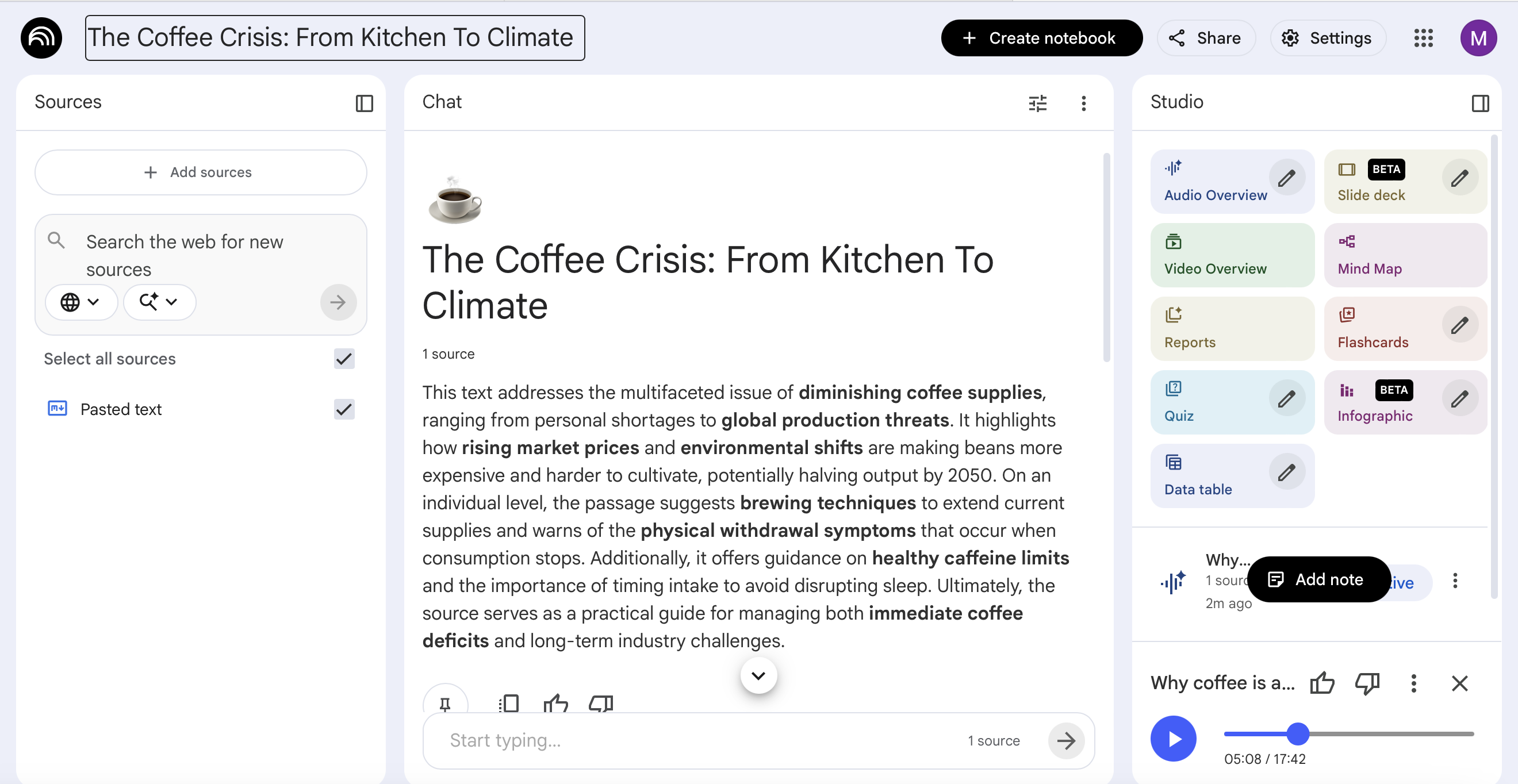
🎧 Audio Overview
Generates a highly realistic, two-person podcast discussing and analyzing the key themes of your sources.
▶️ Video Overview
Creates a visual presentation summarizing your materials (perfect for visual learners).
📄 Reports
Generates a structured, written summary or briefing document based entirely on the uploaded texts.
❓ Quiz
Automatically creates a custom quiz (multiple choice or short answer) to test your knowledge of the sources.
📊 Data table
Extracts numerical data or comparative information from your text and organizes it into a neat table.
🪟 Slide deck BETA
Automatically drafts a presentation outline and content blocks ready to be pasted into Google Slides.
🧠 Mind Map
Maps out the relationships between different concepts, characters, or topics found in your documents.
📇 Flashcards
Creates study flashcards covering the most important definitions and concepts from the text.
📈 Infographic BETA
Attempts to visually represent the core arguments or timelines of your source material in an infographic layout.